Pomodoro and Screen Awake: A Practical Guide to Uninterrupted Focus
How to pair the Pomodoro Technique with keeping your screen awake: cycles, breaks, lo-fi music, fullscreen focus mode, and what a wake lock can do.
NewKitApp 11 min read
You know the shape of an unfocused hour. You open a document, read two paragraphs, remember a message you meant to send, answer it, come back, reread the same two paragraphs, then notice the screen has dimmed itself into sleep because you stopped touching the keyboard for ninety seconds. When the display wakes, so does everything else you had parked in other tabs. Twenty minutes later the document is still on paragraph two.
Two small frictions cause most of that hour: no rhythm to protect the working block, and a screen that gives up on you the moment you stop interacting with it. The Focus Timer & Screen Awake tool on NewKitApp addresses both in one page. It runs the Pomodoro Technique, the classic cycle of one focused block followed by a short break, and it holds your screen awake for as long as a session lasts, or for any length of time you choose when you only need the display to stay on.
This guide explains both halves properly: where the Pomodoro method comes from and why the specific numbers matter less than people think, how the Screen Wake Lock API actually works and what it can honestly promise, and how to use the combined tool for studying, writing, coding, cooking, presenting, or babysitting a long download. Everything described here runs in a browser tab, costs nothing, and requires no account.
Two enemies of a working block
Distraction gets all the attention, but it has a quieter sibling: interruption you did not choose. A notification is an interruption with a source you can silence. A screen that sleeps because you paused to think is an interruption from the machine itself, and it arrives at the worst possible moment, because pausing to think is exactly what focused work looks like from the outside.
The cost of these interruptions is not the seconds they take. It is the residue they leave. When you are pulled out of a task, part of your attention stays behind on the interruption, which is why returning to a document after a chat message feels different from returning after a deliberate break. Researchers who study task switching call this reorientation cost, and it is the reason a forty minute block of protected work often produces more than two hours of fragmented work, even though the fragmented version contains more total minutes at the desk.
The Pomodoro Technique attacks the first enemy by giving your attention a container. The wake lock attacks the second by giving your display an instruction: stay on, this person is working. Neither is magic, and the sections below are honest about their limits. But together they remove the two most common mechanical failures of a working session, which frees you to fight the interesting battles, the ones about what you are actually making.
What the Pomodoro Technique actually is
The method was invented by Francesco Cirillo in the late 1980s, when he was a university student struggling to study. The story he tells is that he challenged himself to focus for just ten minutes, grabbed a kitchen timer shaped like a tomato from the drawer, and found that a visible, ticking boundary made studying possible. The Italian word for tomato is pomodoro, and the name stuck.
The technique that grew out of that experiment has four rules. Choose one task. Work on it for one block of time, classically twenty five minutes, without switching to anything else. Take a short break of about five minutes when the block ends. After four blocks, take a longer break of fifteen to thirty minutes. That is the entire method. There is no app to buy, no course to take, and no correctness police: the tomato timer was just a tomato timer, and the specific numbers were what its dial allowed.
The numbers deserve a moment of attention because people obsess over them. Twenty five minutes is not a physiological constant. It was what the timer did. What the number provides is a promise small enough to keep. Almost anyone can commit to twenty five minutes of one task, and once the block starts, the commitment does most of the psychological work. If your work needs longer runways, fifty minute blocks with ten minute breaks preserve the structure while reducing the switching. If your attention is frayed, fifteen minute blocks with three minute breaks let you rebuild it gradually. The timer accepts any focus length from one to one hundred twenty minutes and any break length up to sixty, precisely because the method survives translation.
What the technique does not do is make work pleasant by force. Some blocks will feel like pushing a rock. The method's answer is that the rock only has to be pushed for twenty five minutes, and then you are allowed to stop. People who stick with Pomodoro for a few weeks usually report the same shift: the question changes from "how will I finish this" to "what can I get done in one block", and that question is answerable.
Why a sleeping screen breaks focus
Modern operating systems dim and then sleep the display after a period without keyboard or mouse input. The idle timeout is usually a few minutes on battery and somewhat longer plugged in, and it exists for good reasons: displays are the biggest power draw on most laptops, and an always-on screen in a bag gets hot.
But plenty of legitimate work looks like idleness. Reading a long document hands free. Following a recipe with flour on your hands. Watching a build or a download you are supposed to babysit. Presenting a slide deck to a room. Keeping a dashboard or a video call visible while you take notes on paper. In every one of these situations, the screen sleeping is not a feature. It is an interruption that arrives from your own hardware, usually followed by a password prompt, which is the least graceful context switch imaginable.
The traditional fixes all have costs. Changing the system sleep settings is buried in different places on every operating system, is often locked down on work machines, and is easy to forget to undo, so the laptop stays awake in your bag all afternoon. Utility apps like Caffeine or Amphetamine solve it on machines where you can install software, but a managed work laptop often forbids exactly that. And keeping the machine awake by wiggling the mouse every minute is its own distraction.
What a wake lock is, and what it is not
Modern browsers expose a standard called the Screen Wake Lock API, and it is a cleaner answer. A web page can request a screen lock, and while that page is visible, the operating system will not dim or sleep the display because of inactivity. No install, no admin rights, no system settings changed. When the page closes the tab or releases the lock, your normal sleep timeouts take over again, with nothing left behind.
The API has honest limits, and knowing them prevents surprises. The lock only holds while the page is visible: switch to another tab or minimize the window, and the browser releases it, which is by design, because an invisible page has no business keeping your screen on. Closing the laptop lid, pressing the power button, or a critical-battery sleep still wins, as they should. And a browser in aggressive battery saver mode can refuse the request entirely. The tool handles all three cases: it takes the lock back automatically when you return to the tab, it tells you when the request was refused, and it pauses the session status while the tab is hidden so you can see what happened at a glance.
One more limit worth stating plainly: a wake lock prevents sleep caused by inactivity. It does not override your employer's power policy at the firmware level, it does not keep a desktop monitor on if the computer itself sleeps for another reason, and it will not stop a machine from shutting down when it runs out of battery. Plug in for long sessions.
One timer, two modes
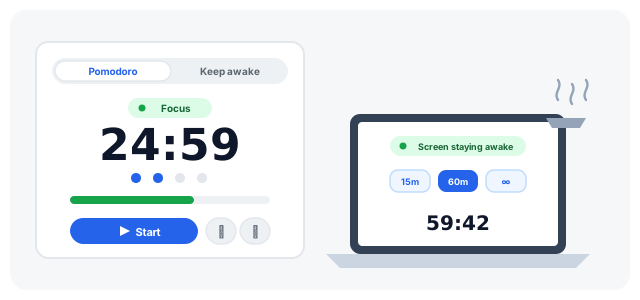
The tool is organized around a mode picker in the sidebar, because the two jobs it does are related but not identical.
Pomodoro mode is the default. Set your focus length, short break length, and long break length, then press Start. The big clock counts down the current phase, four dots underneath track where you are in the cycle of four focus blocks, and the countdown also appears in the browser tab's title, so you can see the time remaining from another window without switching back. When a phase ends, a soft chime sounds and the next phase starts on its own: focus, short break, focus, short break, and after the fourth focus block, the long break. Reset and Skip buttons live in the sidebar for the moments the rhythm needs a manual override, and pausing keeps the remaining time so Resume continues exactly where you stopped.
Keep screen awake mode drops the Pomodoro structure entirely. Pick a duration from fifteen minutes up to eight hours, type any custom length up to twenty four hours, or choose "Until I stop it" for an open-ended session. Press the single button, and the status pill turns green while the lock is held. A timed session counts down and releases the lock when it ends, with the same chime you know from Pomodoro mode. This is the mode for recipes, presentations, dashboards, and downloads, where you want the screen on but do not want a productivity method attached.
Both modes share the same extras. The wake lock is held while a session runs and dropped when it pauses or stops. The countdown lives in the tab title. And the keep screen awake page runs the very same tool with the same two modes, for people who arrived looking for that half of it.
Focus mode, energy saver, and lo-fi music
Three features shape the long sessions.
Focus mode takes the timer fullscreen: the clock becomes enormous, the current quote stands alone in the middle of a dark screen, and everything else on your computer is one glance further away. It is deliberately spare, because a fullscreen clock that also shows notifications would just be a prettier distraction.
The energy saver changes fullscreen into something an OLED can live with: pure black background, dimmed text, no seconds displayed, and a tiny position shift every minute so pixels do not burn in. On phones and laptops with OLED panels, a mostly-black fullscreen page costs meaningfully less power than a lit one, which matters when you are asking a screen to stay on for hours. The browser cannot dim your backlight, so on LCD screens the honest advice is to turn brightness down yourself.
The lo-fi music is generated live in your browser. There are three moods, Rain, a soft beat, and a night pad, all synthesized from oscillators and filtered noise through the Web Audio API. No files are downloaded, which also means no licensing and nothing to buffer. It is off by default, one click on the music icon in the timer card toggles it, and it stops itself when a phase ends so the chime is never buried under the beat. Whether music helps you focus is personal: steady, lyric-free sound masks environmental noise and gives part of your attention a low-stakes job, but if you are doing verbal work like writing, silence often wins. Try one block each way and keep what works.
Tuning the method to your work
The default twenty five, five, fifteen rhythm suits tasks that break into small pieces: email triage, study flashcards, admin chores, editing passes. For work with a long warm-up, like writing code or drafting prose, the switching cost of a break every twenty five minutes can exceed its benefit. Fifty minutes of focus with a ten minute break is the common adaptation, and it fits the same cycle of four.
Breaks deserve as much design as blocks. The purpose of a Pomodoro break is to let attention reset, which means standing up, looking at something far away, drinking water, or walking to a window. Scrolling your phone during a break does not reset attention, it just swaps which screen drains it, and people who try both usually notice the difference in the block that follows.
Two adaptations are worth knowing. Some people run "short breaks only", skipping the long break because it breaks their momentum; if you do this, at least stand up and leave the desk during a short break. Others use the timer backwards for reactive work: start a block when the phone rings and the customer question becomes the pomodoro, which turns interruptions into containers instead of derailments.
And a word about the tab title countdown. It quietly changes behavior: with the remaining time visible from every tab, you stop switching back to check the clock, and every prevented switch is a prevented chance of distraction. Small feature, real effect.
A sample focused morning
Here is the pattern that many people converge on, offered as a starting point rather than a prescription. Plug the laptop in. Open the tool, set focus to fifty minutes and breaks to ten and ten. Choose the night pad if the room is noisy, or leave music off. Enter focus mode. Work one block on the single most important thing, letting everything else wait, because the tab title will tell you when the block ends. Stand up during the break, actually away from the desk. Second block. Long break after the fourth, with water and a window. Most people find the first two days awkward and the third day quietly productive.
For the afternoon's passive tasks, the same page switches roles: keep screen awake mode, ninety minutes, while a slow upload finishes and you clean the kitchen with the progress bar visible from across the room.
Conclusion
Focus is less a personality trait than a set of conditions, and most of the conditions are mechanical. A visible container for the work, a display that does not abandon you for thinking, and honest signals about time. The Focus Timer & Screen Awake tool puts those three in one browser tab, free, private, and nothing to install. Give it one focused block tomorrow morning, the smallest unit the method offers, and let the tomato do the rest.